

Description:
Adds your affiliate ID to specified URLs.
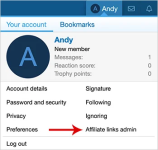
(Example of Affiliate links admin link)
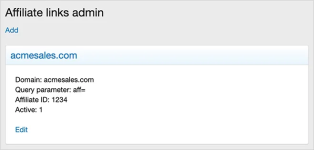
(Example of Affiliate links admin page)
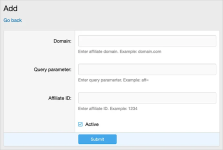
(Example of Affiliate links add page)
(Example of User group permissions)

Features:
All phrases start with affiliatelinks_ for your convenience.
User group permissions:
For the Administrative user group permissions, select Yes for the Affiliate links Admin permission.
How to use:
When a thread is viewed, links in posts which contain domains saved in the Affiliate links will have your affiliate ID added dynamically to the URL.
Questions and answers:
Q: I just created a new post, why don't I don't see my affiliate ID added?
A: Due to the way new posts are displayed after saving, the affiliate ID will not be added until you reload the page.
Adds your affiliate ID to specified URLs.
(Example of Affiliate links admin link)
(Example of Affiliate links admin page)
(Example of Affiliate links add page)
(Example of User group permissions)
Features:
All phrases start with affiliatelinks_ for your convenience.
User group permissions:
For the Administrative user group permissions, select Yes for the Affiliate links Admin permission.
How to use:
- Click the Visitor account menu.
- Click the Affiliate links admin link.
- Click Add link.
- Fill out affiliate information.
When a thread is viewed, links in posts which contain domains saved in the Affiliate links will have your affiliate ID added dynamically to the URL.
Questions and answers:
Q: I just created a new post, why don't I don't see my affiliate ID added?
A: Due to the way new posts are displayed after saving, the affiliate ID will not be added until you reload the page.


