![[Ap Software] Sticky Editor](/data/resource_icons/2/2363.jpg?1790119427)
 [Ap Software] Sticky Editor
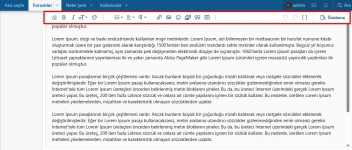
Tired of constantly scrolling up to reach the editor area when writing long content?
With [Ap Software] Sticky Editor, this problem is history! Even when you scroll down the page, your editor area will always remain visible, allowing you to create content seamlessly and much faster.
 Key Features
 Always Visible Editor Area
Access your editor instantly, even while scrolling through long posts.
Mobile Friendly (Responsive)Works smoothly on both desktop and mobile devices.
Compatible with All EditorsFully integrated with the default XenForo editor and BBCode system.
 Why Use It?
 Faster Editing
Save time with an editor that stays in view without needing to scroll.
More Comfortable Writing ExperienceContinue working without interrupting your writing flow.
User-Friendly & LightweightOptimized for performance without slowing down page loading speed.
⚙ Installation & Customization
Go to Admin Cp >> Add-ons >> Install and activate [Ap Software] Sticky Editor.
No additional settings are required — the add-on works automatically after installation.
 Speed up your content creation process, keep the editor area always accessible, and maximize the user experience with [Ap Software] Sticky Editor. Long posts are now more enjoyable and more practical!