

Description:
Allows admin to manage participants in a direct message.
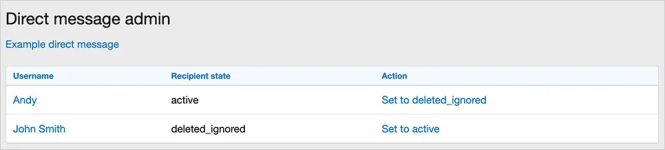
For example the admin creates a direct message about a function and invites many participants, then one of the participants decides they are not interested, at this point the admin can change the Recipient state to deleted_ignore, that way that particular participant will no longer be part of the direct message.
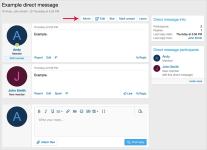
(Example of Admin button)
(Example of Direct message admin page)
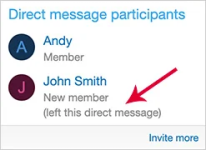
(Example of Direct message participants block)
Features:
Q: Who can see this Admin button?
A: You must be an administrator to see the Admin button.
Q: Can I set
A: Yes.
Allows admin to manage participants in a direct message.
For example the admin creates a direct message about a function and invites many participants, then one of the participants decides they are not interested, at this point the admin can change the Recipient state to deleted_ignore, that way that particular participant will no longer be part of the direct message.
(Example of Admin button)
(Example of Direct message admin page)
(Example of Direct message participants block)
Features:
- Admin can change recipient state.
- Recipient state shown in participant block.
- All phrases start with
directmessageadmin_for your convenience.
Q: Who can see this Admin button?
A: You must be an administrator to see the Admin button.
Q: Can I set
deleted_ignored back to active?A: Yes.


