

Description:
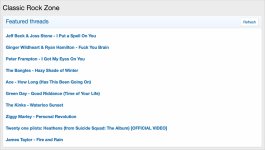
Displays a featured threads widget.
(Example of Featured threads)
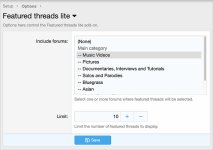
(Example of Options page)
(Example of User group permissions)

Features:
Each page load will present a new block with random featured threads.
All phrases start with featuredthreadslite_ for your convenience.
Create the widget:
1. Go to Appearance -> Widgets
2. Click Add widget
3. Select the Widget definition called Featured threads lite
4. Widget key = featured_threads_lite
5. Display in positions = Forum list: Above nodes
6. Save
User group permissions:
Set the Featured threads lite permission to:
Registered = Yes
Unregistered/Unconfirmed = Yes
Questions and answers:
Q: Can I show the first post message?
A: No. Use the Featured threads add-on for more advanced features.
Displays a featured threads widget.
(Example of Featured threads)
(Example of Options page)
(Example of User group permissions)
Features:
Each page load will present a new block with random featured threads.
All phrases start with featuredthreadslite_ for your convenience.
Create the widget:
1. Go to Appearance -> Widgets
2. Click Add widget
3. Select the Widget definition called Featured threads lite
4. Widget key = featured_threads_lite
5. Display in positions = Forum list: Above nodes
6. Save
User group permissions:
Set the Featured threads lite permission to:
Registered = Yes
Unregistered/Unconfirmed = Yes
Questions and answers:
Q: Can I show the first post message?
A: No. Use the Featured threads add-on for more advanced features.


