
![[ITD] Animated Smileys Pack I](/data/resource_icons/0/125.jpg?1790115967)
A set of 24 animated smileys for your forum's smiley menu.

Configuration: -
Instructions:

Configuration: -
- Login to ACP.
- Go to Content>Simlies.
- Create new category for animated smileys through Add category option (optional).
- select Import.
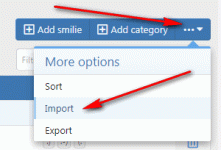
- Select Import from a directory on your server.
- Enter styles/default/xenforo/smilies/ITDSmilies in below box.
- If you created a new smiley category at point # 3 then you need to select same category for all 24 smileys in Smilie category box (optional).
- Click Import at bottom.
Instructions:
- Download the attachment.
- Log in to your BU and go to addon page.
- Select Install/upgrade from archive..


