

Allows you to link keywords in thread posts, thread custom fields, conversation messages, profile posts, resource manager descriptions, AMS articles and Showcase items.
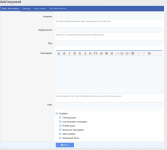
Keyword Options
Replacement - Replace the matched keyword with something else
Title - As an anchor title or as a tooltip
Description - It can display when you hover over the keyword or over the keyword icon (optional)
URL - Target link for your keyword (optional)
Inline style - Use inline CSS to style the keyword
CSS class - Use a custom CSS class
Font Awesome icon - Display a FA icon before or after the keyword
Other settings
Keyword categories
User Criteria
Rel atribute
Open in new tab
Display title in tooltip
Display description on icon hover
Case sensitive
Count clicks
Post limit
Page limit
Priority
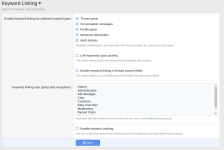
By default keywords are linked dynamically on page load and optionally upon posting.
It has a caching system that you can enable if you have thousands of keywords.
You can exclude keyword linking in posts created by certain user groups.
In ACP it can be found under > Setup > Keyword Linking


Keyword Options
Replacement - Replace the matched keyword with something else
Title - As an anchor title or as a tooltip
Description - It can display when you hover over the keyword or over the keyword icon (optional)
URL - Target link for your keyword (optional)
Inline style - Use inline CSS to style the keyword
CSS class - Use a custom CSS class
Font Awesome icon - Display a FA icon before or after the keyword
Other settings
Keyword categories
User Criteria
Rel atribute
Open in new tab
Display title in tooltip
Display description on icon hover
Case sensitive
Count clicks
Post limit
Page limit
Priority
By default keywords are linked dynamically on page load and optionally upon posting.
It has a caching system that you can enable if you have thousands of keywords.
You can exclude keyword linking in posts created by certain user groups.
In ACP it can be found under > Setup > Keyword Linking


