

Description:
Replaces logo image with logo text.
(Example of logo text)

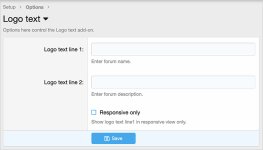
(Example of Options page)
Questions and answers:
Q: How can I change the CSS elements?
A: Edit the andy_logo_font.less template.
Q: How do I make the logo text smaller in responsive?
A: Edit the andy_logo_font.less template and make the font-size smaller for the .logoTextLine1Small element.
Q: Is this add-on compatible with the Logo manager add-on?
A: No.
Code:
Replaces logo image with logo text.
(Example of logo text)
(Example of Options page)
Questions and answers:
Q: How can I change the CSS elements?
A: Edit the andy_logo_font.less template.
Q: How do I make the logo text smaller in responsive?
A: Edit the andy_logo_font.less template and make the font-size smaller for the .logoTextLine1Small element.
Q: Is this add-on compatible with the Logo manager add-on?
A: No.
Code:
Code:
// logo text
.logoText,
.logoTextSmall
{
    color: @xf-paletteNeutral1;
    font-family: @xf-fontFamilyUi;
    font-size: @xf-fontSizeLargest * 1.5;
    font-weight: @xf-fontWeightHeavy;
    padding: 10px 0px 10px 0px;
}
.logoTextSmall
{
    font-size: @xf-fontSizeLarge;
}
.p-nav-smallLogo a
{
    text-decoration: none;
}
.p-nav-smallLogo img
{
    display: inline;
}


