

Description:
Displays a block containing members recently online.
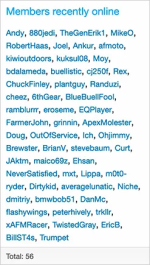
(Example of Members recently online)
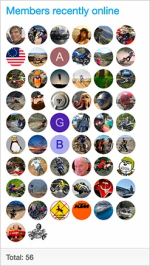
(Example of Members recently online with show avatars option enabled)
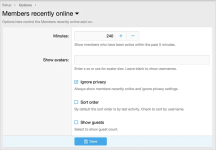
(Example of Options page)
(Example of User group permissions)

Features:
All phrases start with
Creating the widget:
By default the following two user group permissions are set to Yes.
Registered
Unregistered / Unconfirmed
Questions and Answers:
Q: I just installed the add-on, how long does it take to populate the Members recently online block?
A: It requires waiting the number of minutes set in the options page for the Members recently online block to be fully updated.
Q: What action is required by the user to have their name added to the Members recently online block?
A: The member must view a forum, thread or direct message.
Q: What should I set the Minutes to in the options page?
A: On new forums or forums which get few members visiting, you can set the minutes to a full day (1440 minutes) or even longer.
Q: How can I reduce the Members recently online list?
A: Reduce the minutes in the options page.
Q: Does this add-on honor the "Show your online status" in the users preferences?
A: Only if the Ignore privacy is unchecked in the options page.
Q: What does View as admin mean?
A: If the options page setting Ignore privacy is unchecked, then this user group permission allows viewing those hidden members.
Q: How can I change the widget title?
A: Change the membersrecentlyonline_members_recently_online phrase.
Displays a block containing members recently online.
(Example of Members recently online)
(Example of Members recently online with show avatars option enabled)
(Example of Options page)
(Example of User group permissions)
Features:
All phrases start with
membersrecentlyonline_ for your convenience.Creating the widget:
- Admin Control Panel -> Appearance -> Widgets
- Click Add widget
- Widget definition = Members recently online
- Widget key = members_recently_online
- Title = (leave blank)
- Display in positions = Forum list: Sidebar
- Click Save.
By default the following two user group permissions are set to Yes.
Registered
Unregistered / Unconfirmed
Questions and Answers:
Q: I just installed the add-on, how long does it take to populate the Members recently online block?
A: It requires waiting the number of minutes set in the options page for the Members recently online block to be fully updated.
Q: What action is required by the user to have their name added to the Members recently online block?
A: The member must view a forum, thread or direct message.
Q: What should I set the Minutes to in the options page?
A: On new forums or forums which get few members visiting, you can set the minutes to a full day (1440 minutes) or even longer.
Q: How can I reduce the Members recently online list?
A: Reduce the minutes in the options page.
Q: Does this add-on honor the "Show your online status" in the users preferences?
A: Only if the Ignore privacy is unchecked in the options page.
Q: What does View as admin mean?
A: If the options page setting Ignore privacy is unchecked, then this user group permission allows viewing those hidden members.
Q: How can I change the widget title?
A: Change the membersrecentlyonline_members_recently_online phrase.


