

Add-On Overview
The product allows setting a thumbnail for a thread using one of the attachments attached to the thread.
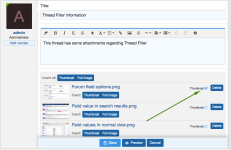
The product also adds an icon to current thumbnail/default thread icon allowing to quickly change the thumbnail of threads from thread list (in forum view, What's New page etc.). It also allows to attach an image or delete existing attachments immediately, without having to edit the thread itself:
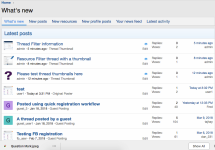
Thumbnails are shown in What's New/New Posts pages as well, and can be edited from these pages directly:
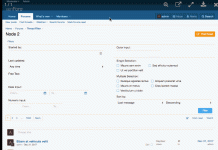
Optionally a lightbox popup can be enabled in which cases the full version of the image is opened when clicking on the thumbnail:
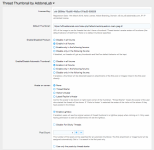
In product's options page you can configure the default thumbnail URL to use for the threads, that don't have a thumbnail attached. If no default is specified, XenForo's default behavior is kept (e.g. showing thread starter's avatar as thread icon):
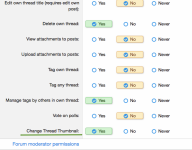
The product also implements a usergroup permission, which should be enabled for users to be able to change the thumbnail of their thread. Moderators having permission to edit a thread and manage attachments there will be able to set the thumbnails for the threads started by other users:
The product allows setting a thumbnail for a thread using one of the attachments attached to the thread.
The product also adds an icon to current thumbnail/default thread icon allowing to quickly change the thumbnail of threads from thread list (in forum view, What's New page etc.). It also allows to attach an image or delete existing attachments immediately, without having to edit the thread itself:
Thumbnails are shown in What's New/New Posts pages as well, and can be edited from these pages directly:
Optionally a lightbox popup can be enabled in which cases the full version of the image is opened when clicking on the thumbnail:
In product's options page you can configure the default thumbnail URL to use for the threads, that don't have a thumbnail attached. If no default is specified, XenForo's default behavior is kept (e.g. showing thread starter's avatar as thread icon):
The product also implements a usergroup permission, which should be enabled for users to be able to change the thumbnail of their thread. Moderators having permission to edit a thread and manage attachments there will be able to set the thumbnails for the threads started by other users:


