![[XenCustomize] Ad Between The Posts](/data/resource_icons/2/2103.jpg?1790119202)
Introducing Ad Between The Posts – Effortless Ad Placement for XenForo 2
Maximize your XenForo forum's advertising potential with our state-of-the-art add-on, Ad Between The Posts. Seamlessly integrate advertisements within your forum threads, eliminating the need for manual template editing. With a user-friendly interface, effortlessly choose from 7 predefined ad spots to add and position ads, enhancing your revenue and user engagement.
Key Features:
- Place ads effortlessly between the XenForo thread posts.
- Customize ad blocks without template editing.
- Choose from 7 ad placements: Post #1, Post #2, Post #5, Post #7, Post #10, Post #15, Post #20.
- Enable or disable ads per block.
- Exclude ads from specific forums or thread IDs.
- Manage ad visibility with usergroup permissions.
- Default permissions automatically applied upon installation.
- Utilize HTML, CSS, and XenForo template syntax for creative freedom.
Explore the screenshots for a visual preview.
General Options:
- Exclude ads from specific forums or thread IDs.
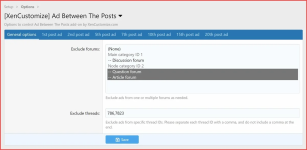
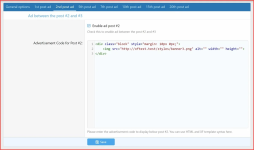
Example ad code:
- Tabbed interface.
- Enable or disable ads per block.
- Customize ad blocks without template editing.
- Utilize HTML, CSS, and XenForo template syntax for creative freedom.
- Choose from 7 ad placements: Post #1, Post #2, Post #5, Post #7, Post #10, Post #15, Post #20.
Usergroup Permission:
- Manage ad visibility with usergroup permission.
- Default permission automatically applied upon installation. "Yes" to those who have "View thread content" permission.

Thread View Example:
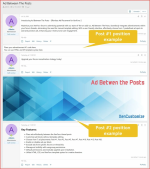
- Post #1 and Post #2 ad placement example