![[XenCustomize] Limit Resource Downloads](/data/resource_icons/1/1982.jpg?1790119104)
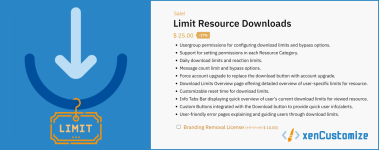
Introducing the Limit Resource Downloads add-on
Limit Resource Downloads add-on gives forum admins powerful control over resource downloads by allowing them to set a variety of limits, such as:- Daily download limits
- Positive Reaction requirement
- Minimum message count limits
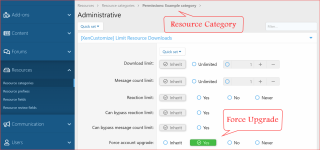
- Force account upgrade
In addition, the add-on can encourage user engagement on the forums and can lead to more account upgrades, boosting your site’s revenue.
Key Features
Here are some of the key features of the Limit Resource Downloads add-on: Usergroup permissions: This allows admins to fine-tune who can download resources, and under what conditions.
 Support for setting permissions in each Resource Category: This gives admins even more granular control over download limits.
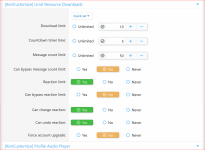
 3 types of limits: Admins can choose from customizable download limit, reaction limit, and message count limit.
 Ability to bypass limits: Admins can allow users to bypass limits by setting them to “Unlimited” or by granting them the appropriate usergroup permissions.
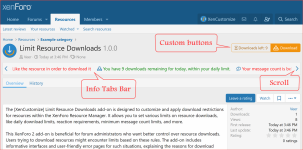
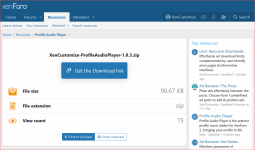
 Info Tabs Bar: This provides a quick overview of the user’s current download limits for the viewed resource.
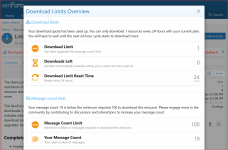
 Download Limits Overview Page: This provides a detailed overview of user-specific download limits for the accessed resource.
 Custom Buttons: These buttons provide quick user info/alerts, such as the number of downloads left or an alert that the download limit has been exceeded.
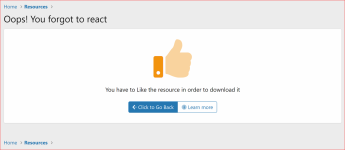
 User-friendly error pages: These pages explain and guide users through download limits and restrictions.
 Admin options: Admins can customize the download limit reset time, enable/disable the Info Tabs Bar and Download Limits Overview Page.
 Easy customization: Custom classes and dedicated style properties for effortless customization.
 Restrictions on changing or undoing reactions, controlled by admin options & usergroup permissions.
If you’re looking for a powerful way to control resource downloads on your XenForo Resource Manager, the [XenCustomize] Limit Resource Downloads add-on is a great option. It’s packed with advance features and gives admins the flexibility to fine-tune download limits to meet their specific needs.
Screenshots, Install and Setup
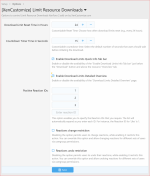
Install "[XenCustomize] Limit Resource Downloads" like any other XenForo add-on. In the admin options:- Default setting for the Countdown timer is 5 seconds, which you can adjust to your preferred duration.
- You must specify your preferred positive reaction IDs.
- Default positive reaction IDs are: 1, 2, and 3.
- If you would like to restrict users changing or undoing reactions, then activate these options:
- Reactions change restriction.
- Reactions undo restriction.
Next, explore Usergroup permissions. These 5 permissions are automatically set up during the installation process:
- "Reaction Limit" permission is granted to user who can react on resources.
- "Bypass Reaction Limit" permission is for those who can Bypass Flood Check.
- "Bypass Message Count Limit" permission is set for users who can Bypass Flood Check.
- "Can Change Reaction" permission is set for users who can Download.
- "Can Undo Reaction" permission is set for users who can Download.