
![[XenHub] Enhanced Featured Carousel](/data/resource_icons/2/2539.jpg?1790119661)
Description
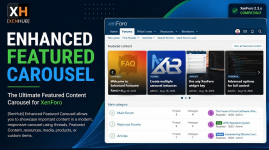
[XenHub] Enhanced Featured Carousel is a powerful and highly customizable featured-content carousel system for XenForo.It allows site owners to showcase important content in a modern, responsive slider using content from XenForo threads, Featured Content, XFRM resources, XFMG media, DragonByte eCommerce, and custom/manual items.
The add-on supports multiple carousel instances, automatic and manual content sources, responsive layouts, autoplay, looping, hover information overlays, navigation arrows, pagination, forum targeting, user-group targeting, custom widget placement, and extensive appearance controls.
It is designed to increase content visibility, improve content discovery, and attract more user attention while remaining fully integrated with XenForo’s widget, style, permission, and node systems.
Main Features
 Modern Featured Content Carousel
 Image-Based Content Cards
 XenForo Featured Content Support
 XenForo Thread Support
 XFRM Resource Manager Support
 XFMG Media Gallery Support
 DragonByte eCommerce Compatibility
 Custom URL / Manual Content Support
 Multiple Independent Carousels
 Automatic Content Sources
 Manual Featured Items
 Trending Content Support
 Latest Content Support
 Most Viewed Content
- Most Replied Content
 Most Reacted Content
 Random Content
 Targeted Content Display
 Forum / Node Restrictions
 User-Group Restrictions
 Scheduled Featured Items
 Custom Display Order & Priority
- Automatic Thumbnail Detection
 Thread Attachment Image Support
 User Avatar Fallback
 Content Information Overlay
- Author Information
- Content Date
 Views, Replies & Statistics
 Hover Effects
 Zoom Effect
 Lift Effect
 Fade Effect
 Autoplay
 Pause on Hover
 Infinite Loop
 Modern Navigation Arrows
 Pagination Dots
 Touch & Swipe Navigation
 Responsive Slide Counts
 Desktop Layout Controls
- Tablet Layout Controls
 Mobile Layout Controls
 Custom Thumbnail Width & Height
 Custom Information Overlay Height
 Custom Accent Colors
 Gradient & Overlay Controls
 Border Radius Controls
 Card Spacing Controls
 Optional Block Title
- Optional User Avatar
- Optional “View All Featured Content” Button
 Forum List Above-Nodes Placement
- Forum List Below-Nodes Placement
 Custom Widget Placement
 Custom Widget Key Support
 XenForo Widget Integration
- XenForo Style Integration
 Dark Style Support
 Light Style Support
 Dependency-Free Carousel JavaScript
 Lazy-Loading Friendly
 Full ACP Management
 Dedicated ACP Options
- Carousel Preview
 Enable / Disable Individual Carousels
 XenForo Permission Integration
- Fully Responsive UI
- XenForo 2.3.x Compatible
Best Suited For
- XenForo community forums
- News and content communities
- Resource websites
- Media communities
- Gaming forums
- Technology communities
- Marketplace websites
- Product communities
- Featured article websites
- Any XenForo site that wants to highlight important content visually


